Meridian: Why I built a Markdown-first calendar
Until a few months ago, my notes, tasks, and appointments were spread across five apps. Notes lived in Obsidian. My own tasks lived in the TaskNotes plugin inside Obsidian. Tasks I share with my wife lived in Todoist. Appointments lived in Proton Calendar. Shopping lists lived in Google Keep.
None of these apps are bad. What bothered me was the seams between them — and two things I couldn’t fix by switching to a different combination.
The first: I want to keep track of our child’s calendar, but she doesn’t need a Proton account. Every system I tried wanted her to be a user before she could have a calendar. I wanted something closer to the paper calendar on the kitchen wall: everyone writes on it, everyone reads it, nobody owns it. The corporate version of the same problem shows up at work regularly — a colleague creates a recurring meeting, goes on vacation, and now nobody can move it.
The second: I wanted tags to be real things. In Obsidian a tag is a label. I wanted a tag that can have its own description and its own tags.
So I built Meridian: a calendar, task manager, and notes app where every entry is a plain Markdown file.
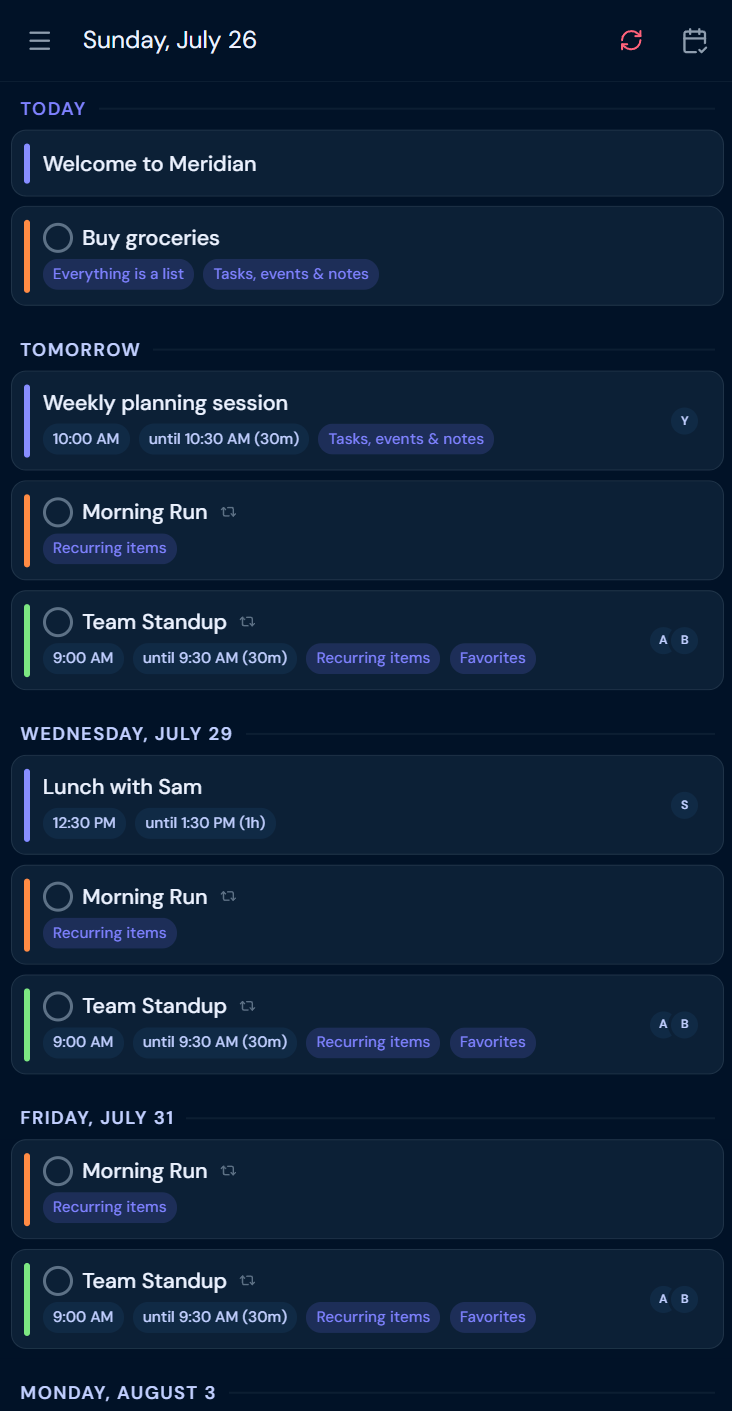
What follows is roughly how that went, from those first ideas to the app I use today.
What I knew before I wrote any code
A handful of things, and I’d been turning them over for a while. I wanted a Markdown-based
app for notes, tasks, and calendar events, where every entry is a Markdown file with YAML
frontmatter. The important part was a negative: I did not want to model the entity types
explicitly. A thing would be a task because it had a done field, an event because it had
a date, a note because it had neither. Type was something you read off the metadata, not
something you declared.
On top of that: [[wikilinks]] between entries, because links are what turn a collection
of notes into something you can actually navigate; nested tasks shown inline; and tags
that are entries in their own right, not just labels.
These were the ideas I set out with, and I still like them. Most of what came next I didn’t plan.
A prototype, and a year of not building it
In spring 2025 I built a first prototype called idea-craft. Then I discovered TaskNotes, which already did much of what I was sketching, and did the sensible thing: I stopped building and used it for a year instead.
That year turned out to be important groundwork. It taught me two things I couldn’t have reasoned my way to from a blank page.
Mobile is where this is decided. Obsidian is excellent on the desktop, but I use these tools mostly on a phone. TaskNotes does a good job there — the limit isn’t the plugin, it’s that a plugin has to work through Obsidian’s own interface. Small things end up taking a couple of taps more than they would in Google Calendar or Todoist, and those taps add up when you’re capturing something quickly. That gap is the biggest single reason I eventually built something of my own.
Recurrence has to stay readable. iCal (RFC 5545)
is the standard, and it’s capable — my whole calendar could probably be encoded as its RRULE, RDATE, and EXDATE strings. But those strings are built for machines: FREQ=MONTHLY;BYDAY=1FR,2FR is no fun to hand-edit, and the messy real cases only get
worse. Since the point was files you can read, I wanted recurrence I could read too. (If
iCal compatibility ever matters, I can add it underneath.)
A hundred versions on a phone
For a moment I considered not building an app at all — just proposing my recurrence format to TaskNotes and staying in Obsidian. But everything I really wanted to fix, from the mobile UX to a shared calendar without accounts, lived outside the file format, where a plugin couldn’t reach.
So this spring I started over on my phone, in a single very long chat session with Claude — which turned out to be good enough at spinning up working web prototypes that I could design by using, not just by sketching. I built one I called plaintext-os and iterated on it something like a hundred times — most of those on one question, what the frontmatter should actually look like, and the rest on making it usable. Somewhere in the middle it got the name Meridian.
It worked. That was the problem. It worked well enough to show me the real version of the app — and that a single generated file, growing with every change, wasn’t a foundation I could keep building on.
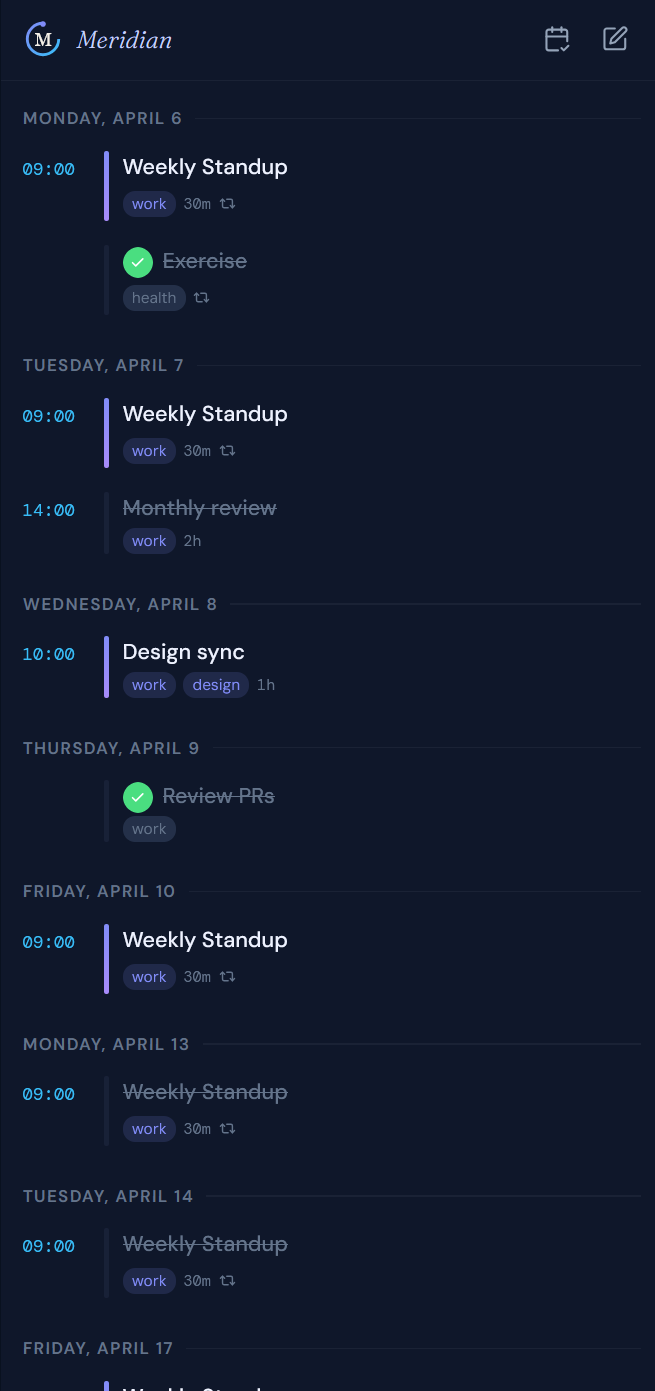
On 2026-05-22 I moved to a desktop, set the prototype aside, and started a proper repository: React, TypeScript, Tailwind, shadcn/ui, Vite. The first day’s commits scaffold the app, wire up GitHub Pages, and turn it into a PWA — a progressive web app rather than native ones: I need to support both iOS and Android, and a single PWA is far less to maintain than two native apps.
(How that rewrite actually went — and what two months of building this way taught me — is its own story, and its own article.)
Then the “simple” idea started growing
Here’s the part I want to be honest about, because it’s the real shape of the project.
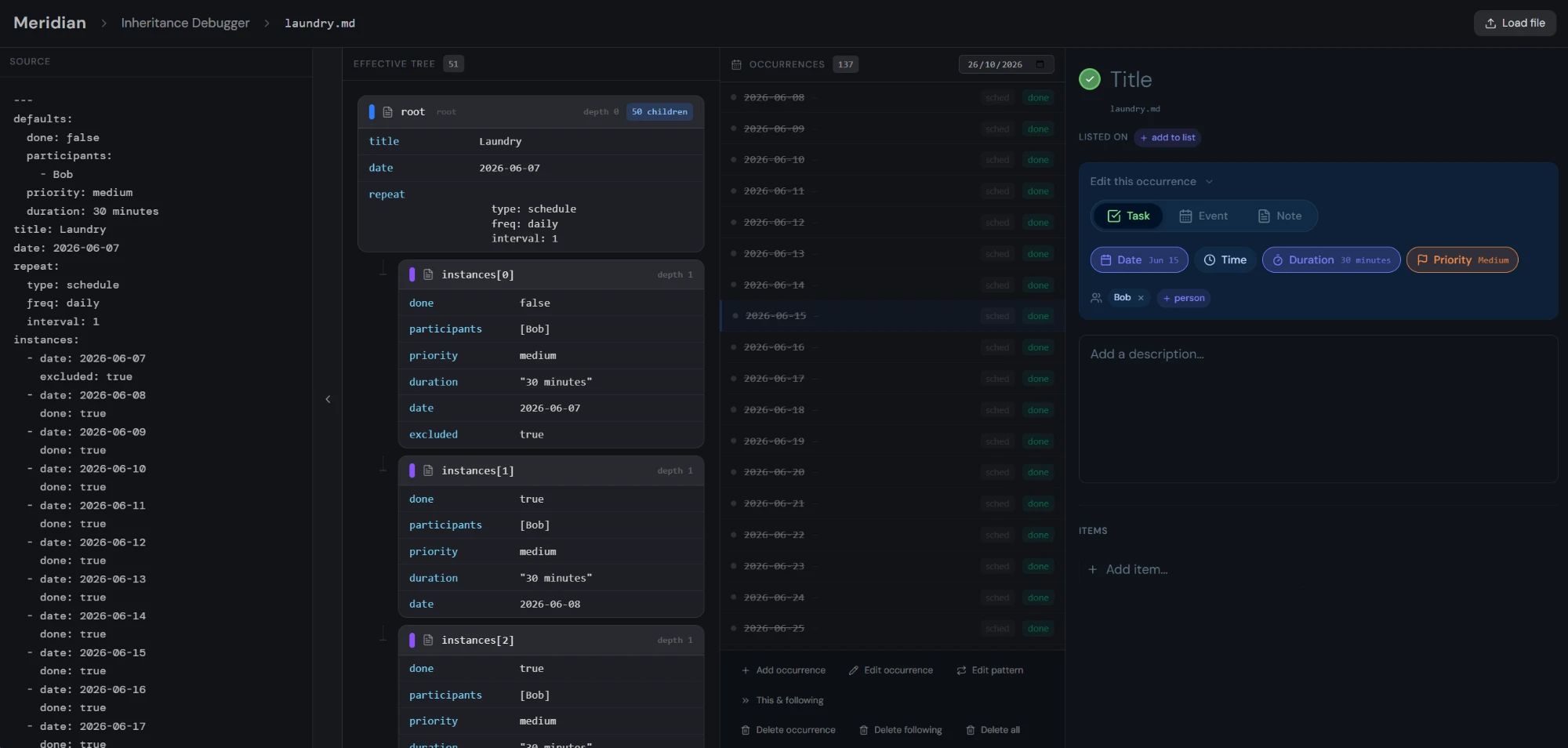
One thing AI changes about building software is that a throwaway dev tool is suddenly cheap to make. So four days in, I had Claude build a debugger: a page that shows how a YAML file becomes repeat patterns, how those patterns expand into occurrences, and what happens to the file when you cancel or move one. It was genuinely useful for about a week, while I chased the worst of the recurrence bugs; afterwards I half-considered deleting it again.
On 2026-06-03 entries gained participants — you tag people on an entry, and later you can filter the whole calendar down to one person. This is the shared-family-calendar idea from the very beginning finally showing up in the app: everyone on the same kitchen calendar, no accounts required.
On 2026-06-11 entries stopped living only on my laptop: GitHub became a storage backend, followed within days by auto-sync, conflict detection, and a vault switcher.
On 2026-06-16 the description field became a real editor — CodeMirror 6, with wikilinks rendering as inline chips and checkboxes you can actually click.
None of this came from a master plan, but none of it fell from the sky either. Some of it I’d been carrying since idea-craft — I already knew I wanted GitHub as a backend, and I’d run into CodeMirror before. The pieces clicked into place one after another as the small premise turned out to ask for them: files you can read want a recurrence engine you can debug; files you sync want conflict handling; Markdown you edit by hand wants a real editor.
Everything is a list
By late June the app worked, and I had a naming decision to make.
I had wikilinks. I had tags implemented as wikilinks, which is how I got my first-class tags. And I had a backlinks panel on every entry. Then the questions started. A wikilink-as-tag matters more than a wikilink buried in a paragraph — should both appear in backlinks? Should they look different? Do they need separate sections?
And underneath those, a harder one: most people have never heard of a backlink — or a wikilink, for that matter. I was about to ship an app whose central concepts needed a glossary.
So on 2026-06-20 I removed vocabulary rather than adding it, and inverted the links
while I was at it. The old topics field had each entry point up to the categories it
belonged to; the new items field has each entry
point down to the entries beneath it. So an entry now simply shows its items, plus a listed on row for the lists it appears on — and the whole model collapsed into one
sentence: every entry is a list.
| Entry | Is a list with… | Its items are usually… |
|---|---|---|
| Task | a done property | subtasks |
| Project | a done property | tasks |
| Event | a date, plus optional time and duration | agenda points or follow-ups |
| Tag | — | everything tagged with it |
| Note | no special properties | related entries |
A project is a task whose items are tasks. A tag is simply a list of everything filed under it. A backlink is just “the lists this appears on” — a phrase that needs no explanation, because everyone has used a list.
I do find that elegant, but elegance isn’t the main point. The main point is that you never have to answer “is this a task, a subtask, or a project?” The only question left is do I want to track whether this is done? — which is a question you can actually answer.
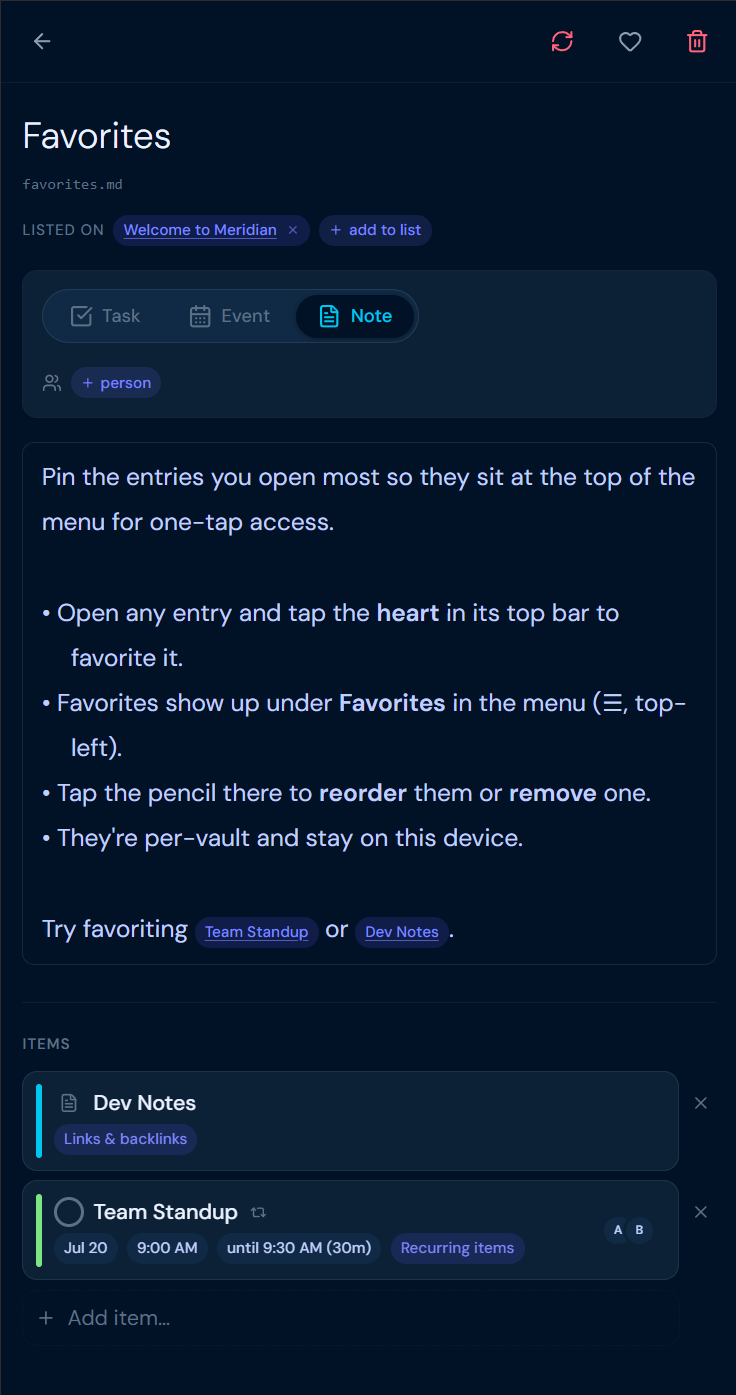
An entry can also sit on several lists at once, and that makes possible something I use constantly. We keep a list called This Week for things we want to finish this week but don’t want to pin to a day yet. “Pizza” sits on This Week and on Cooking at the same time. A strict hierarchy can’t do that — Pizza would have to live in one place. Tags always could, which is exactly why I loved them and wanted them to be first-class; in Meridian, lists do the same job.
None of this is really the pitch. The pitch is the promise on the surface: tasks and calendar in one app, stored as Markdown, with flexible hierarchies and flexible recurrence. “Everything is a list” is just how I ended up building the flexible-hierarchy part — the rest would work without it. I didn’t design it up front either; I backed into it while trying to keep the app simple to explain.
The part I don’t put on the landing page
A data model clicking into place is the fun part — and, conveniently, the part that fits in a blog post. The rest of that summer was the other kind of work: making it reliable enough to actually use day to day.
First the files needed to live somewhere I could reach from any device. I started with GitHub and fine-grained access tokens — you paste a token, and Meridian reads and writes a repository you own — because the readers I care about first are developers, and they already have a GitHub account they trust. (Pasting a token is a pain on a phone, so I later added one small, stateless Cloudflare Worker that trades OAuth tokens, turning setup into a single connect click.) Finding a backend at all was harder than I expected: I wanted a password-protected folder in the cloud with an API, and most options either want access to everything in your account or don’t send the CORS headers a browser app needs. I compared the candidates in plans/storage-backend-survey.md; Dropbox and OneDrive are the strongest alternatives, and I may add them.
The recurrence engine was where readable files paid off most. When it misbehaved —
occurrences that wouldn’t move, cancellations that didn’t stick, a series that expanded
one day too far — I could open the offending .md, read exactly what it claimed, and tell
Claude “here’s what it does, here’s what it should do.” Against a file you can read, most
of those bugs turned mechanical.
The layers were a different kind of trouble. Between a keystroke and a file on GitHub there are now four of them — the UI, a React store (Zustand), an on-device cache (Dexie/IndexedDB), and the storage backend — and each is a fresh chance for them to quietly disagree. Readable files didn’t help much there; those bugs I chased the ordinary way, from a bug report down to a root cause, with Claude reading through the code until it found what had actually fallen out of sync. (One file per concept does help here too: two devices only collide when they edit the same entry, so a conflict affects one entry instead of the whole calendar.)
I won’t pretend it’s finished. I’ve used Meridian for my own tasks for about two months now, and my wife is just starting to keep hers in it; we haven’t moved the family calendar off Proton yet. The most useful missing piece is probably iCal import — until you can pull an existing calendar in, switching means retyping it, which is a lot to ask. Most of the recent work has been the unshowy kind, spread across sync, layout, and UX, plus enough performance work to keep the calendar smooth on a phone as a vault fills up. That polish is most of the distance between a prototype that works in a demo and something you’d rely on.
Where it fits
It is not a better note-taking app than Obsidian, and it isn’t trying to be. Obsidian’s plugin ecosystem and linking depth are hard to beat. Meridian borrows the idea that Markdown is the source of truth and pushes it the other way — into the tasks-and-calendar territory where Google Calendar and Todoist still win on mobile.
One note for the Obsidian crowd, since our audiences overlap: there’s also an Obsidian theme called Meridian, by someone else entirely. Same word, different project — this Meridian is the calendar app.
If any of this sounds like the thing you’ve been assembling out of separate apps, try it: the whole app runs in your browser, with nothing to install and no account. The built-in example vault needs nothing at all; to keep your own data, you point Meridian at a GitHub repository, or at a local folder in a Chromium browser (Chrome or Edge on the desktop). Tell me what works and what doesn’t — the best place for that is a GitHub issue — and the code lives in the same repository.